MathCopy just got a notable upgrade: the “MathCopy - AI Math” browser extension. Once turned on, math equations copied from ChatGPT and Gemini get cleaned up right on the page, before they ever reach Word, so the first-try success rate is now nearly flawless. This post explains why it helps, and walks through installing, pinning and turning it on correctly.
What is the MathCopy - AI Math browser extension?
It is a free extension for Chrome and Edge that runs on chatgpt.com and gemini.google.com. When you click the Copy button right on a ChatGPT or Gemini answer, the extension reads that exact answer as shown on the page, including any math equations, rewrites it into the correct format, and only then writes the result to your clipboard. You still click Copy the same way you always have, nothing extra to do.
Why does an extension make equations more accurate?
MathCopy on your desktop already reads and converts most equation syntax when you paste with Ctrl + Alt + V. But some ChatGPT and Gemini answers format equations in less predictable ways (unusual symbols, equations inside a table, nested lists), and in those cases the fix-up on MathCopy's side does not always guess correctly. The extension solves that at the source: it processes the text right where it was generated, on the ChatGPT or Gemini page itself, where the original formatting is unambiguous, so what reaches MathCopy is already clean. Combine both, and the first-try success rate climbs to nearly flawless.
For more on why equations from AI tend to break with a plain Ctrl + V, see math equations from AI breaking in Word: causes and fixes.
Installing and pinning the extension, step by step
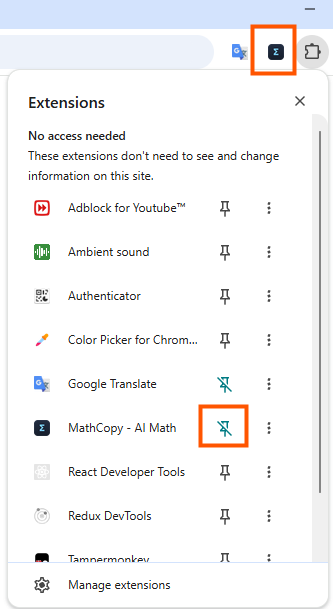
The part people usually miss is not installing, it is pinning the extension to the toolbar. By default, browsers tuck every newly installed extension behind a puzzle-piece icon, so without pinning it is easy to forget you installed it, or to assume it is not working.
- Install the extension. Open MathCopy - AI Math on the Chrome Web Store (or on Microsoft Edge Add-ons if you use Edge), click Add to Chrome (or Add to Edge), then confirm.
- Pin it to the toolbar. Click the puzzle-piece icon near the top-right of the browser, find “MathCopy - AI Math” in the list, then click the pin icon next to it so the extension's icon always shows on the toolbar instead of hiding behind the puzzle piece.
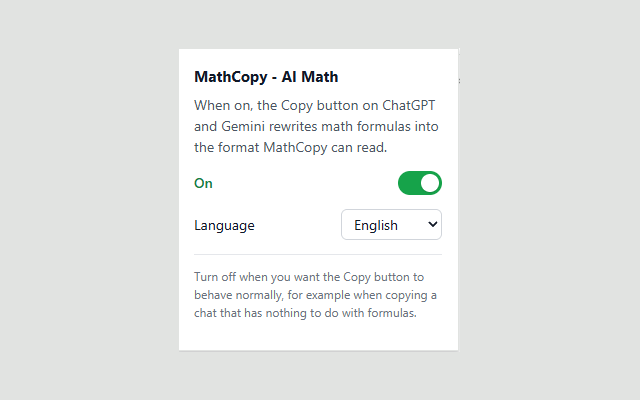
- Turn it on. Click the MathCopy icon you just pinned and check that the switch is set to “On”. You only need to do this once, it stays on from then on.
Using it day to day
Once it is on, there is nothing extra to remember. Ask ChatGPT or Gemini a question with an equation, click Copy on the page like always, then open Word, place your cursor and paste with Ctrl + Alt + V through MathCopy. The equation lands as a proper MathType or Equation object, editable right away. If you are new to pasting with MathCopy, see the MathCopy user guide or how to copy equations from AI into Word as MathType.
Can't find the icon, or it seems like it is not working?
- No icon on the toolbar: it is still installed, just not pinned yet. Repeat the pinning step above.
- Equations still break with the extension on: use the “Copy prompt” button right inside MathCopy to ask the AI to rewrite the equation in the right format, then copy and paste again.
- Want to pause it: click the extension icon and turn the switch off, useful when copying a chat passage that has nothing to do with equations and you want to keep the original formatting.
Frequently asked questions
Does the browser extension replace the MathCopy desktop app?
No. The extension only cleans up the equation right on the ChatGPT or Gemini page when you click Copy. You still open MathCopy and paste with Ctrl + Alt + V to turn it into MathType in Word.
Does MathCopy still work without the extension?
Yes. MathCopy already reads and converts most equations when you paste with Ctrl + Alt + V. The extension just cleans up answers with unusual formatting earlier, so the success rate is higher.
Does it work with Claude?
Right now the extension only runs on chatgpt.com and gemini.google.com. For Claude, you still copy and paste with Ctrl + Alt + V as usual.
Does the extension read or store my chat content?
No. It only reads the answer currently shown on the page, at the moment you click Copy, to rewrite its formatting. It does not store or send that content anywhere else.
What about Chromium browsers like Brave?
Chromium-based browsers such as Brave usually install extensions from the Chrome Web Store the same way described below.
Faster: paste straight from ChatGPT
MathCopy turns equations from AI into MathType in Word with Ctrl + Alt + V.