Download MathCopy for Windows
Install it, sign in with Google and try it free for 7 days.
MathCopy
Windows 10/11 · 64-bit · What's new?
Installed in a minute
System requirements
Windows 10 or 11
64-bit.
Word and MathType
MathType is needed for MathType equations.
Internet connection
To check your account and convert PDFs.
When your browser or Windows warns you
MathCopy is a new app, so your browser and Windows will show a warning because it isn't digitally signed yet. That's expected. Just follow the steps below.
Let your browser save the installer
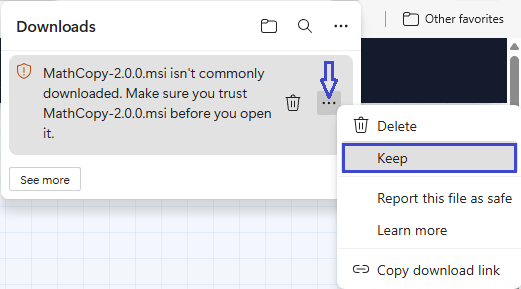
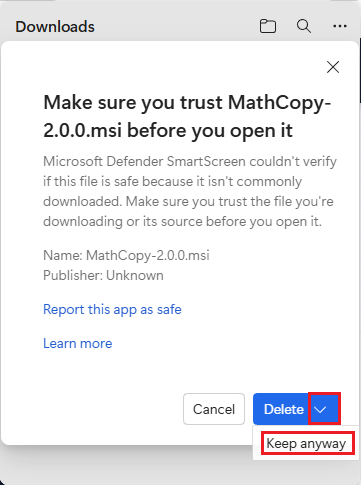
After the download finishes, your browser (Edge/Chrome) may warn that the file "isn't commonly downloaded". Click the "..." button next to the file and choose "Keep", or, if a larger dialog appears, click the arrow next to "Delete" and choose "Keep anyway" to save the file.
Click "Run anyway" when Windows warns you
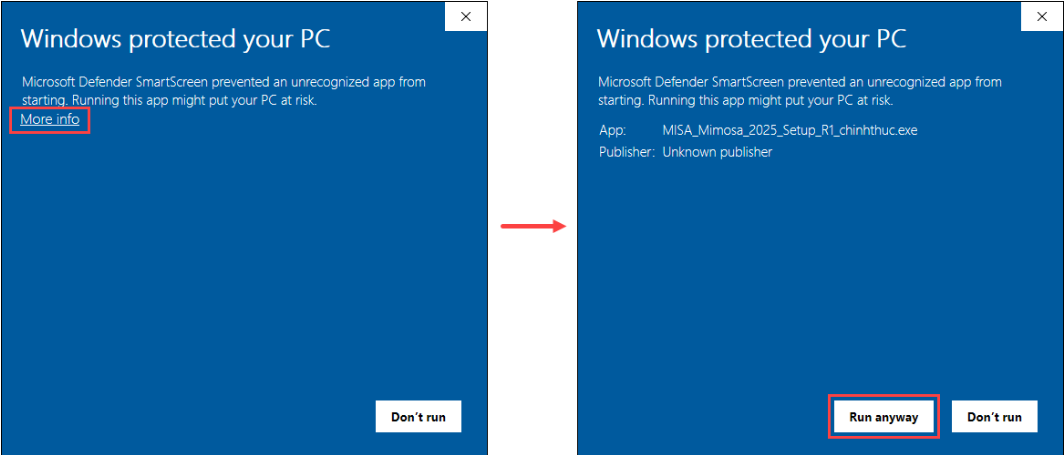
When you run the installer, Windows will show "Windows protected your PC". Click "More info", then click "Run anyway" to continue installing.