MathCopy - AI Math add-on
A free add-on for Chrome and Edge that works alongside MathCopy on your PC. It helps MathCopy read the equations in ChatGPT and Gemini answers more accurately.
Free, no sign-in. Brave and other Chromium-based browsers can install it from the Chrome Web Store.
Why install it
Equations land right far more often
Far more of them paste correctly on the first try, so there is almost nothing left to fix by hand afterwards.
You copy the way you always do
Same Copy button under the answer. No extra step, nothing to paste into a box first.
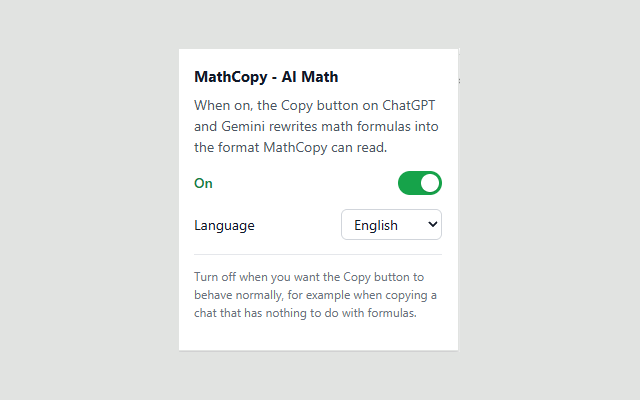
One click to turn it off
Copying part of a chat that has no math in it? Flip the switch off and you are done.
Three steps to set it up
Install the add-on
Open its page on the Chrome Web Store or Microsoft Edge Add-ons, click “Add to Chrome” (or “Add to Edge”) and confirm.
Pin it to the toolbar
Click the puzzle-piece icon at the top right of the browser, find “MathCopy - AI Math”, then click the pin icon beside it.
Turn the switch on
Click the icon you just pinned and check that the switch reads “On”. You only do this once, the add-on remembers it.
Then use it like any other day
Ask the AI
Open ChatGPT or Gemini, ask something with math in it and wait for the full answer.
Hit Copy
Click the Copy button under the answer, exactly as you always would.
Paste into Word
Put the cursor in Word and press Ctrl + Alt + V: the equations land as MathType, ready to double-click and edit.
You still need MathCopy on the PC
The add-on is the browser half. Getting the equations into Word is still MathCopy for Windows, so install that first if you have not already.
Read the full guide, from install to your first equation in Word
The add-on currently works on chatgpt.com and gemini.google.com. On other AI sites, copy and paste with Ctrl + Alt + V as usual.